
Eigent: the Open Source Cowork meets Z.ai GLM-4.7
Enterprise browser and terminal automation with CAMEL Workforce and GLM-4.7
 Eigent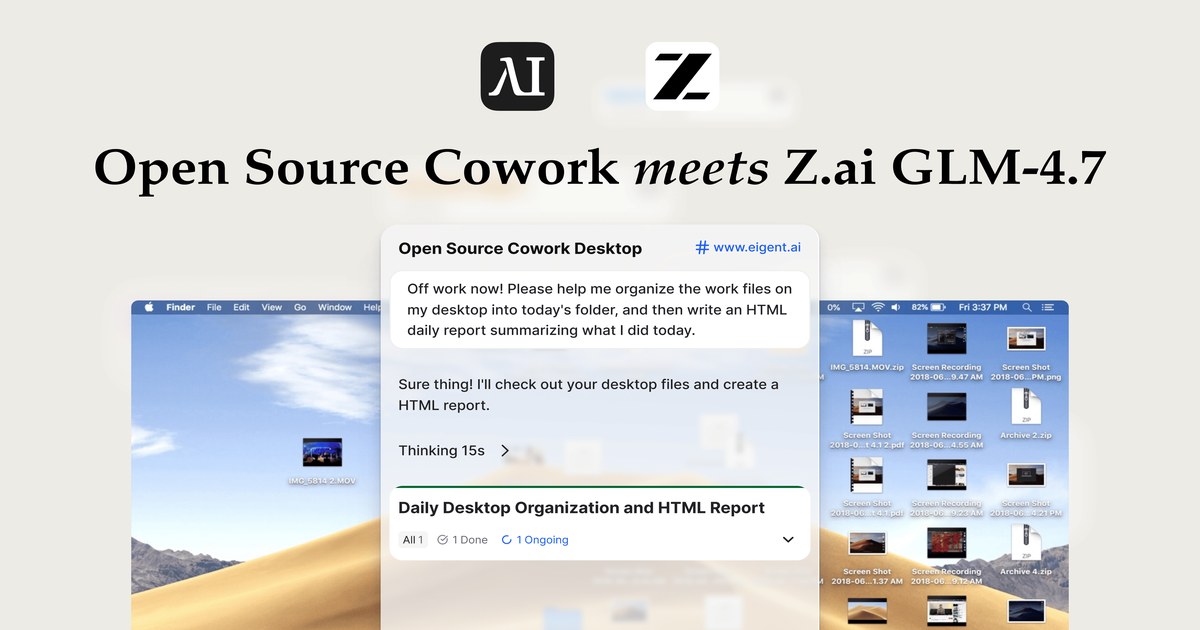
Abstract
In real enterprise environments, many internal tools, dashboards, and legacy systems operate entirely in the browser or terminal, forming the backbone of daily business operations.
To automate these complex systems, we introduce Eigent, an open-source multi-agent workforce application that runs locally and can be fully set up from source, with a strong focus on browser and terminal automation, essentially serving as your open-source Cowork alternative for enterprise workflows.
In this post, we'll explore how Eigent leverages CAMEL's Workforce architecture and terminal automation to handle multi-step enterprise tasks. We'll also take a closer look at GLM-4.7, analyzing its performance in terminal automation and the architectural features that support long-horizon, agentic workflows.
Background: What Is Eigent and How It Supports GLM-4.7
Eigent is an open-source, multi-agent workforce product that runs locally on your desktop. It is built on a workforce-style multi-agent architecture and equipped with general-purpose capabilities such as:
- Browser automation
- Terminal automation
- MCP (Model Context Protocol) integrations
This design allows agents in Eigent to behave like real human workers, operating directly within desktop environments—without requiring deep API integrations or constant workflow reconfiguration.
As foundation models continue to improve, integrating them with Eigent's open-source multi-agent system enables developers and enterprises to apply LLM capabilities to real-world use cases quickly and effectively.
That's why Eigent integrated GLM-4.7 immediately after its release.
Getting Started with GLM-4.7
-
Cloud Mode:
Simply select GLM-4.7 from the top model dropdown.
-
Bring Your Own Key (BYOK):
Go to Model Settings → GLM, input your Z.ai API key, and set the model name to
GLM-4.7.
Need help? Check out our guide on configuring your Z.ai API key.
A step-by-step video tutorial is also available below.
GitHub Repository & How to Set Up Eigent
GitHub Repository
👉 https://github.com/eigent-ai/eigent
Quick Start: Setting Up the Environment
You can run Eigent in two ways:
Option A: Zero-Config Desktop App (Recommended for Users)
For users who want to start automating tasks immediately:
- Download the client from the Official Website
- Install the
.dmg(macOS) or.exe(Windows) - Launch the app — the local backend starts automatically
Option B: Developer Setup (From Source)
For developers who want to inspect or customize the system.
1. Prerequisites
- Node.js
v18–22 - Python
3.10+
2. Clone and Install
# Clone the repository
git clone https://github.com/eigent-ai/eigent.git
cd eigent

# Install frontend dependencies
npm install
3. Run the Application
# Run in development mode
npm run dev
Once running, you can configure LLM providers (GLM-4.7, etc.) directly in the settings.
For advanced configuration and troubleshooting, refer to the Official Documentation.
Under the Hood: Eigent Full Stack & CAMEL Workforce Architecture
System Overview
Eigent is a local-first desktop application powered by a multi-agent orchestration engine built on CAMEL Workforce.
Key architectural principles:
- Fully local execution
- Decoupled full-stack design
- Strong data sovereignty guarantees
- No cloud-resident agent execution
1. Frontend
The frontend acts as the control plane for agent configuration and workflow monitoring.
Tech stack:
- React + TypeScript
- Electron
- Zustand (state management)
- React Flow (visual agent orchestration)
The frontend communicates with the backend through secure local HTTP requests.
2. Backend
The backend is a local Python server built with:
- FastAPI + Uvicorn
- Python 3.10+ (managed by
uv) - PostgreSQL (via SQLModel / SQLAlchemy)
It hosts the CAMEL multi-agent framework, which manages:
- Workforce orchestration
- LLM interactions (remote via Z.ai or local via vLLM)
- Toolkits for browser, terminal, and document automation
CAMEL Workforce: A Multi-Agent System Inspired by Organizations
At the core of Eigent lies CAMEL Workforce, a decentralized multi-agent system designed for complex enterprise tasks.
Agent Roles
-
Coordinator Agent
Maintains global state and dispatches subtasks.
-
Task Agent
Decomposes high-level objectives into atomic tasks.
-
Worker Agent
Executes tasks using domain-specific tools.
Asynchronous Communication: TaskChannel
Task execution is coordinated via an asynchronous message queue:
- Workforce initiates a task
- Worker agents poll for assignments
- Results are pushed back upon completion
This design ensures non-blocking, scalable execution.
Dynamic DAG Construction
Enterprise workflows are rarely linear.
CAMEL Workforce dynamically constructs a Directed Acyclic Graph (DAG):
- Independent tasks run in parallel
- Dependent tasks are blocked until prerequisites are completed
Example:
Search FlightsandSearch Hotelsexecute concurrentlyGenerate Itinerarywaits until both are DONE
Fault-Tolerant Mechanisms
Failures are treated as expected states, not fatal errors.
Supported recovery strategies:
- RETRY – Re-run the task
- REPLAN – Modify the task based on failure logs
- REASSIGN – Move the task to another agent
- DECOMPOSE – Break the task into smaller subtasks
Testing GLM-4.7 with Real-World Terminal Automation
We evaluated GLM-4.7 using Eigent's terminal automation on a realistic end-of-day workflow.
Sample Task
"Off work now! Please help me organize the work files on my desktop into today's folder, and then write an HTML daily report summarizing what I did today."
What the Agent Must Do
- Scan desktop files
- Create a date-based folder
- Identify and move work-related files
- Infer daily activities from file changes
- Generate a structured HTML report
This requires long-horizon reasoning, context preservation, and multiple tool calls.
In our tests, GLM-4.7 successfully completed the workflow.
How GLM-4.7 Supports Agentic Task Performance
GLM-4.7 is a coding-oriented model optimized for agent workflows, offering a strong cost–performance balance.
Interleaved & Preserved Thinking
GLM-4.7 introduces advanced reasoning controls:
-
Interleaved Thinking
Thinks before every response and tool call.
-
Preserved Thinking
Retains reasoning blocks across turns, reducing context drift.
-
Turn-Level Thinking Control
Enable reasoning for complex tasks, disable it for lightweight ones to save cost and latency.
These features make GLM-4.7 particularly suitable for long-horizon, multi-step automation.
Conclusion & Next Steps
Eigent provides a production-grade, local-first environment for deploying AI agents that operate directly inside real enterprise systems.
By combining:
- CAMEL's workforce-based multi-agent architecture
- Terminal and browser-level autonomy
- Strong observability and fault tolerance
Eigent delivers the core properties required for enterprise-grade AI deployment:
controllability, auditability, and data sovereignty.
We also showed how GLM-4.7, when integrated with Eigent, offers robust reasoning capabilities for complex workflows.
Get Involved
Eigent is fully open-source. We welcome developers, researchers, and enterprise teams to explore and contribute.
- 👉 GitHub: https://github.com/eigent-ai/eigent
- 👉 Discord: https://discord.camel-ai.org
Recent Posts

Claude on Android Now Works Like a Laptop on Chromebooks and Foldables
Claude on Android now behaves like a laptop app on Chromebooks, Googlebooks, and foldables, with a resizable sidebar, trackpad, right-click, and desktop shortcuts.
Eigent
Eigent Release Notes v1.0.7: Split Sessions, Clearer Task Logs & Reusable Work
Eigent v1.0.7 adds split-view Sessions, separate windows, clearer task logs and approvals, reusable Skills and Automations, and more reliable workflows.
 Douglas Lai
What Is the Grok API guidelines Parameter? Custom Content Moderation, Explained
Learn what the Grok API guidelines parameter does, which content categories it supports, how to set it, and the request limits and errors to expect.
Eigent


